Applications, specifications and model comparison
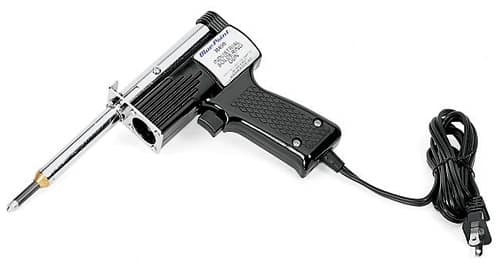
R490 — Industrial Soldering Gun (Blue-Point®). Support soldering or controlled heating with the specified tool or accessory.
Applications and industries
Equipment repair, electrical assembly and workshop maintenance are potential settings for suitable soldering tasks.
- Identify whether the SKU is the tool, a tip or a replacement component.
- Then check the parent model, tip form and fuel or power requirements.
These industry examples are selection guidance, not additional manufacturer approvals.
Features of R490
- Dual wattage elements: high wattage heats tip in seconds, lower wattage maintains rated tip temperature
- Effective tip temperature of 1,000 °F or more for heavy-duty, sustaining soldering
- Trigger-activated control is convenient, easy-to-use and provides instant response
- Built-in work light illuminates the work area
- Tip and element (TE) assemblies are plug-in units that can be changed within a minute
- Integral tool stand prevents heated part of the tool from damaging surrounding areas
- Plastic storage case
- UL® listed
Specifications and fit checks
Compare compatible model and tip function. Heating tools require the manufacturer’s fire, ventilation and work-area precautions.
Similar-model selection for R490
A sufficiently close alternative has not been verified for this SKU. Therefore, compare the exact function, dimensions and mating equipment before choosing another model. Ask Techmaster Vietnam for a model-specific comparison.
R490 selection checklist
For R490, verify the required task, working range, interface dimensions and package contents against the official catalogue details. This final check helps prevent ordering a visually similar model with a different fit or capability.
Choosing R490 for the task
Separate the complete heating tool from its tips, connectors, cleaning accessories and replacement parts. A shared product family does not mean every item provides a heating function. Identify the intended process, such as soldering or another function explicitly listed by the manufacturer. Then compare the tip form, tool compatibility and supplied attachments for that process.
For a complete kit, check which functions and accessories are included rather than assuming the broadest family configuration. Also, confirm fuel or power requirements and the applicable work-area precautions. A stated power range does not by itself establish suitability for every material or component. If replacing a part, use the parent model and exact part reference. Follow the maker’s instructions for handling, storage and maintenance. This selection guide does not set operating temperatures or replace the required controls for heat, fire, fumes or flammable materials.
Planning the workshop application
Define the intended job in practical terms before comparing options. Record the equipment or component involved, the operation to perform and the access available around it. Include the current tool or accessory if this purchase replaces an existing item. That context helps distinguish a size change from a different product function. It also makes the application and industry examples above easier to assess against the actual work.
Understanding the catalogue record
The official listing identifies this model as Industrial Soldering Gun (Blue-Point®). Its catalogue grouping is Soldering / Guns. Use that description to identify the product format, then read the individual specifications for the details that matter to the job. A category describes where the product sits in the range; it is not an additional compatibility approval.
The current record does not provide a complete dimensional specification table for this item. The model description and any listed features remain useful references, but they do not justify filling in missing dimensions, capacities or approvals. If fit depends on a measurement or a particular parent tool, identify that requirement in the inquiry and obtain confirmation before choosing the item.
The catalogue country-of-origin field is USA. This field concerns the listed product origin; it does not identify local inventory, delivery time or the warranty terms of a Vietnam quotation. Confirm those commercial details separately.
Comparing options before ordering
No sufficiently close alternative is confirmed in the comparison section. That is an unresolved selection question, not proof that every other model is unsuitable. For a useful comparison, provide the required function, dimensions and parent equipment. A supplier can then check a specific candidate against those requirements. Do not substitute a related accessory, a kit component or a product with a similar name without resolving the relevant fit details.
Purchase questions and receiving checks
What should the order include?
Ask for a line-item description of the supplied configuration. For a set or kit, confirm the contents; for a component, confirm the quantity and the matching parent model where relevant. If photographs show a larger assembly or several items, do not assume all of them form part of this SKU. Keep any essential accessories and documents explicit in the quotation so that receiving checks can follow the same requirements.
Receiving, care and record keeping
On receipt, compare the item and its packaging with the ordered model, quantity and configuration. Check the supplied components and any requested documentation. Keep the product identification visible in the workshop’s inventory record. If the delivered item differs from the confirmed order, resolve that difference before assigning it to the planned job. This is especially useful when a range contains visually similar sizes or accessories for different parent tools.
For continued use, follow the manufacturer’s instructions for inspection, cleaning, storage and maintenance. Do not assume that a cleaning chemical, lubricant or maintenance method used on another tool is suitable here. Keep damaged or uncertain equipment out of the planned task until its condition is assessed. Record any replacement parts by model so future orders use the confirmed reference rather than a visual guess.
Ordering in Vietnam
Send Techmaster Vietnam the model number R490 and details of the task or existing equipment. Include any required sizes, connections and accessories.
Before ordering, confirm the quotation, lead time, package contents and applicable warranty terms. The official catalogue is the technical reference; it does not establish local stock or a Vietnam selling price.
For the source record, see the official Snap-on product listing. You can also browse the Vietnam product catalogue for related tools.